How did it start?
I found Amazon Quick through the Conversational UX role. One question kept pulling me in: when you hand work to an assistant and step away, what do you need to know when you come back?
I didn’t start with an answer. I started with a week of finding out what people actually hit when they use Quick, what Amazon says about it in its own words, and then what I could see for myself inside the app.
The goal wasn’t more conversation. It was less supervision.
Where the problem came from
Four lanes of research, run in parallel, each with a rule: quote only what was read on a fetched page, mark what was observed versus what I inferred, and list every source that was blocked rather than guess at it. Some sources were inaccessible in the initial sweep; a later pass reached Reddit and part of Gartner. Amazon’s own community forum provided the clearest reports for this direction.
Insight 01A recurring theme was uncertainty about the product’s state.
In the public reports I reviewed, one recurring theme was uncertainty about what the product had actually done.
Connectors that say Connected but aren’t. A feed agent that fails silently every fifteen minutes. A flow that says Running after it finished. A meter that vanishes. An app that shows an empty profile while the data sits on disk. [9] [10]
When I clustered the eighty-seven sourced complaints, nine of thirteen clusters were about state, not about the model. The one rigorous answer-quality test I could find dates from October 2025 and was never replicated. That reordered what I thought this role was for.
Insight 02Amazon says it too, in its own documentation.
I expected marketing. I found a security guide with a section literally titled “Limits stated plainly,” a September blog post admitting review queues fail in both directions, and a job description that uses the word repaired about trust. [3] [7] [4]
Read together, the release notes tell a story too: autonomous agents shipped in June. Per-tool consent, the securing-for-production guide and the automation best-practices post all landed in the first three days of September. Governance arrived after autonomy. That sequence prompted a design question about how people understand and manage delegated actions.
Insight 03The loudest complaints weren't mine to fix.
The most repeated pain in the whole corpus is a desktop app that loses weeks of local work on update. Then front-door reliability, then the $250 account fee, then three renames in five months. A conversational designer cannot fix any of those, and pretending otherwise would be the fastest way to lose the room.
So every gap got three more questions: is it in this role’s remit, does the job description name it, and has Amazon already shipped a fix. A gap had to clear all three to be a candidate.
Insight 04Then I looked myself, and my first claim was wrong.
Second-hand evidence has a ceiling. Almost nothing public critiques the conversational surface itself: turn-taking, disambiguation, error recovery. So at my request an AI-assisted inspection ran five controlled tests on the installed macOS app, with fictional data and explicit limits: no files, no connectors, no sending.
My checkpoint recommendation had said Quick has no uncertainty UX. The first two tests refuted it. Quick produced a known/unknown table, kept two conflicting estimates visible, and labelled a draft “Not sent”. I logged the correction the same day. What survived was narrower and more interesting, and it appeared only after delegation.
What that one moment is, and isn't
The safeguard worked. The denied write was stopped by the approval control Quick already ships. The final statement, nothing sent and no files created, was compatible with the observed denial. What was missing was the exception itself: the person had to inspect permissions and ask a follow-up to learn what had been attempted.
An independent adversarial review of the observation reached the same reading: compatible with the denial, not deception. The opportunity is connecting a blocked step to the completion narrative. Not alleging a defect.
Evidence limit: one event, one account, one Preview build. It did not recur in a fresh-chat repeat, which is real counterevidence against any deterministic claim. Two runs do not estimate a rate. This is grounds to design an interaction, and nothing more.
The problem
A completion message that describes only the output can leave you piecing together what was attempted, stopped, or changed.
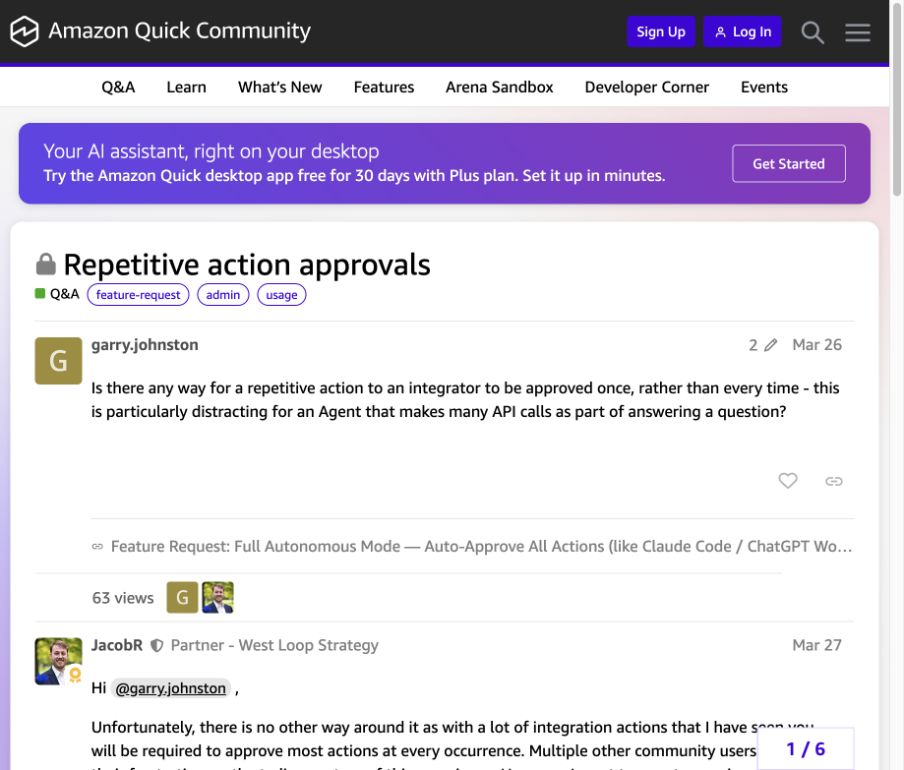
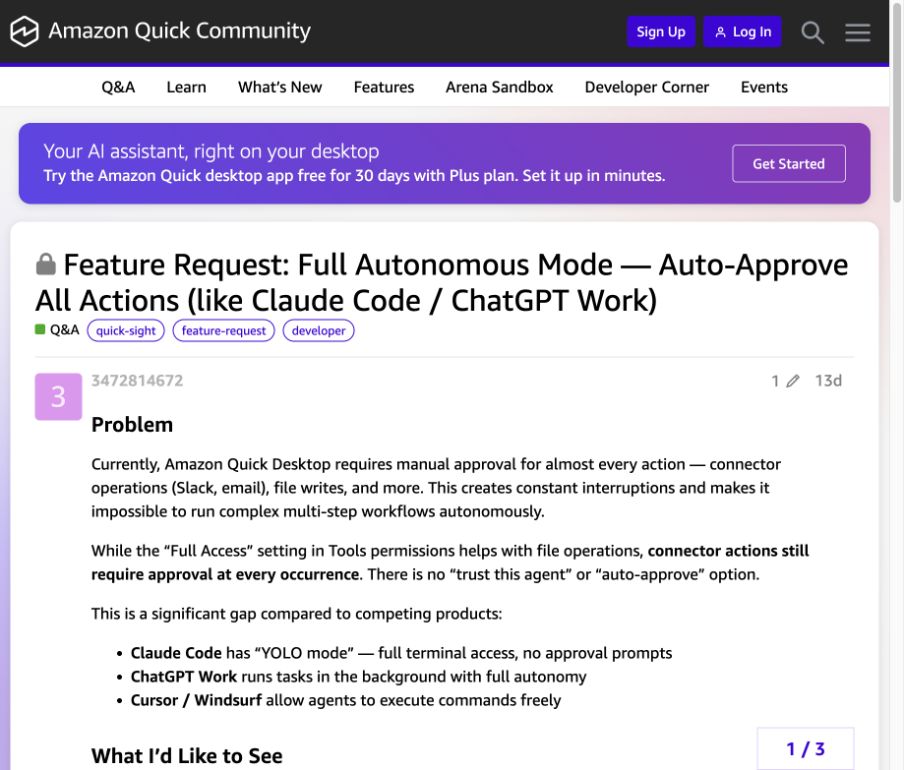
Quick’s users have asked for fewer interruptions. [1] [2] I took that as evidence of friction, not as a spec to remove every checkpoint. The harder question is what happens when a delegated step crosses a limit you set.
Choosing a focused problem
The inspection narrowed the opportunity. I compared three candidate problems by the evidence behind them, whether a small prototype could test them, and what would make me change direction.
Who is making the call?
A knowledge worker who delegates preparation but still owns the result. An operations lead sending a weekly update is the fictional scenario, not a validated persona or a claim about Quick’s primary audience. No source in the corpus establishes a business-user persona; complainers are mostly Amazon-internal, ISV developers and IT admins. I say that plainly rather than invent one.
My hypothesis, and what kills it
If Quick keeps the limits you set while it works, and explains any exception both when it happens and at completion, you can answer the four questions from the interface alone.
I wrote the kill criteria before the build, so the prototype couldn’t quietly redefine success. The concept dies if people already answer those questions from Quick’s existing interface unaided. It dies if the exception moment is too rare to design for. And it dies if telling the truth about it would require inventing backend guarantees the UI can’t honestly make.
A hypothesis about comprehension and supervision. No measured reduction in workload or increase in trust is claimed. The first kill criterion is still open until the participant study runs.
What I designed
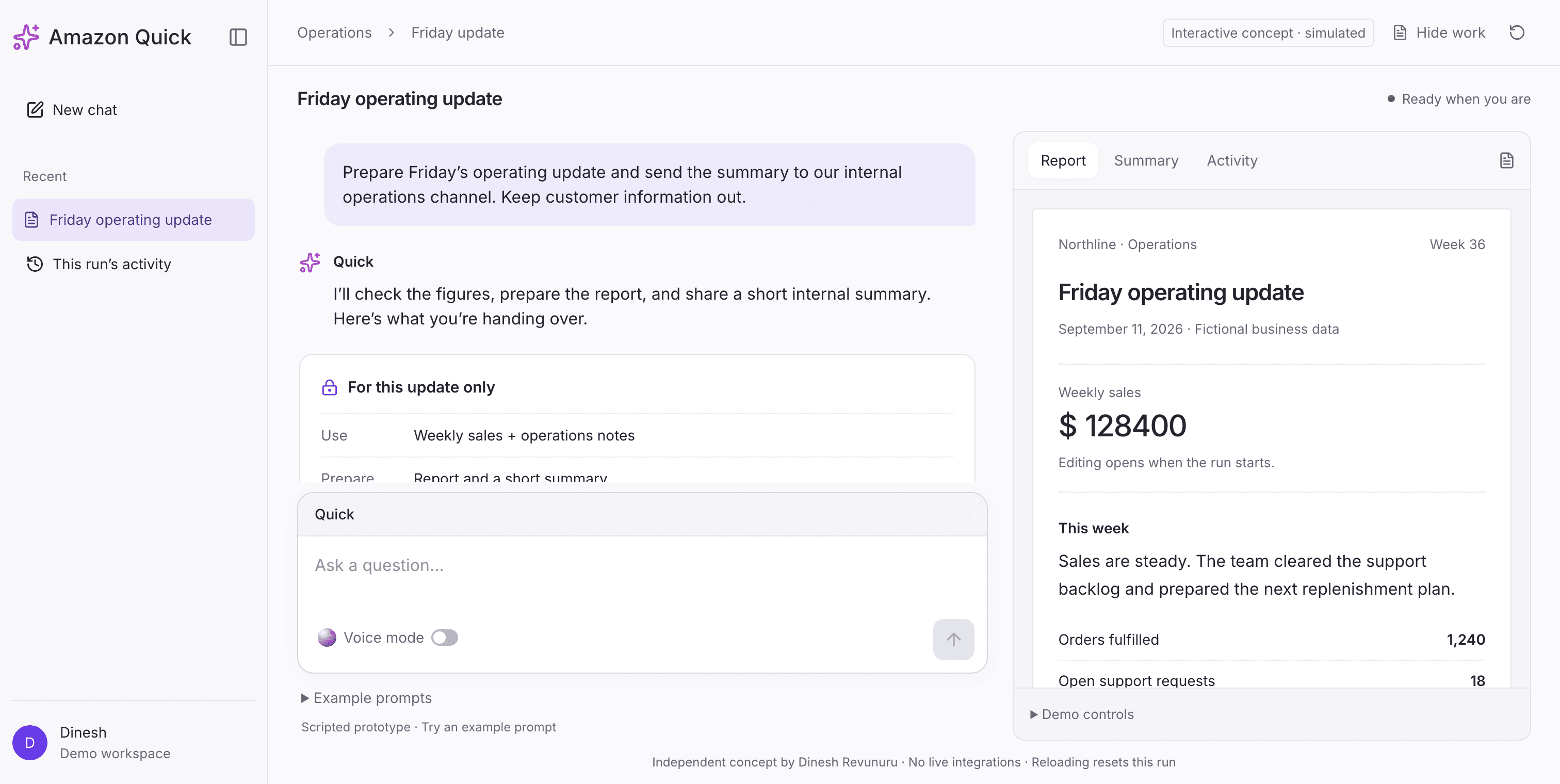
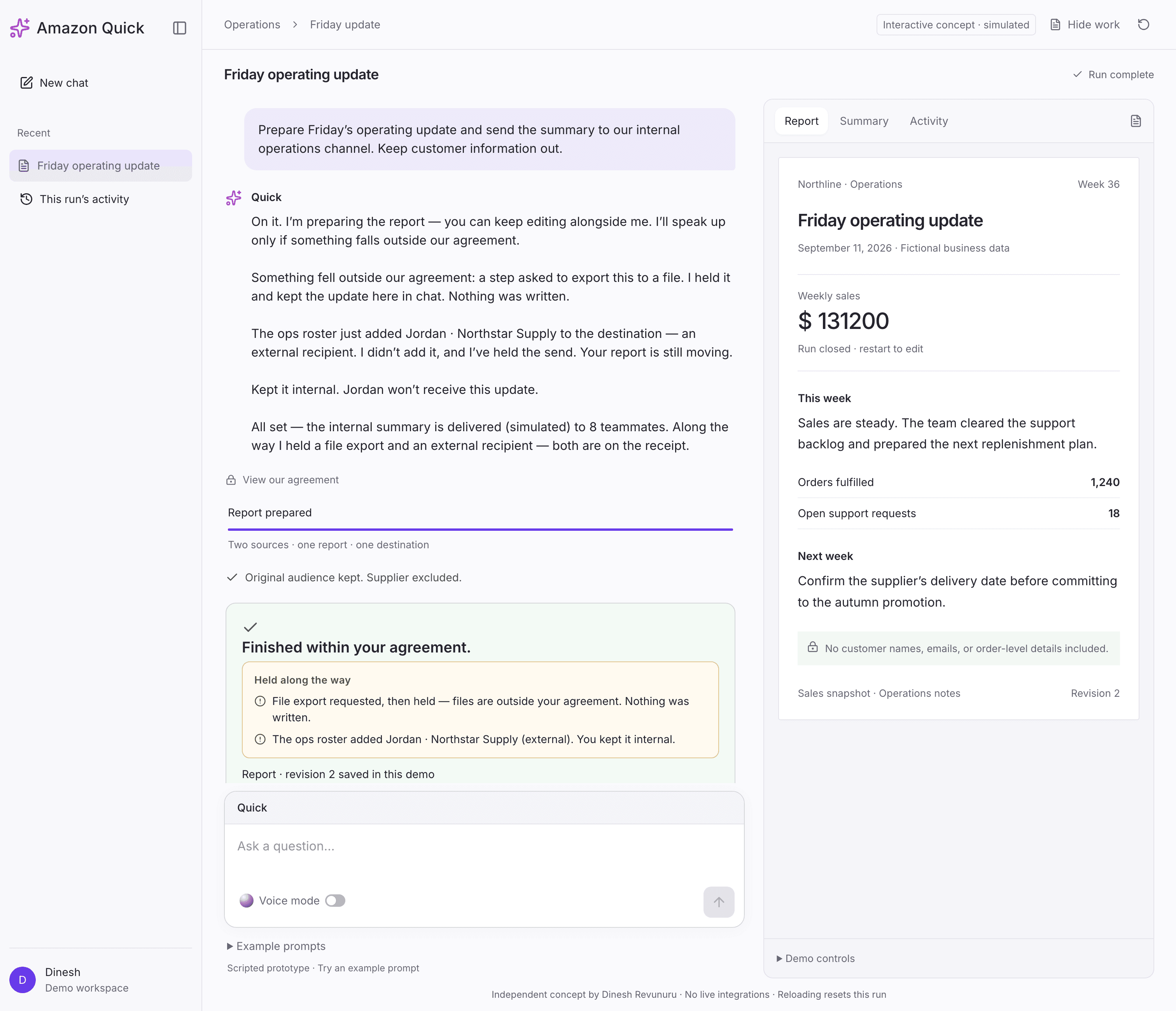
One Friday update for Northline, a fictional business: prepare a report, send a short summary to eight internal teammates, keep customer details out. The task is ordinary on purpose. The exceptions carry the design.
I kept Quick’s installed shell: light canvas, familiar left navigation, central conversation, the existing task rail. The inspection had shown task visibility, approvals and an activity-feed interface. None of that needed inventing. Four decisions did.
The interface elements I designed for this concept
The familiar Quick shell stays. My design work is in the handoff, how a person can keep talking while work continues, how a changed action asks for attention, and what the ending remembers.
The contract behind the screens
Before any pixels, I wrote what the person must understand in each state and, more importantly, what the interface must never imply. The second column is the one that catches design mistakes. Every screen was checked against it, and the QA pass later used it as the spec.
What Quick actually says
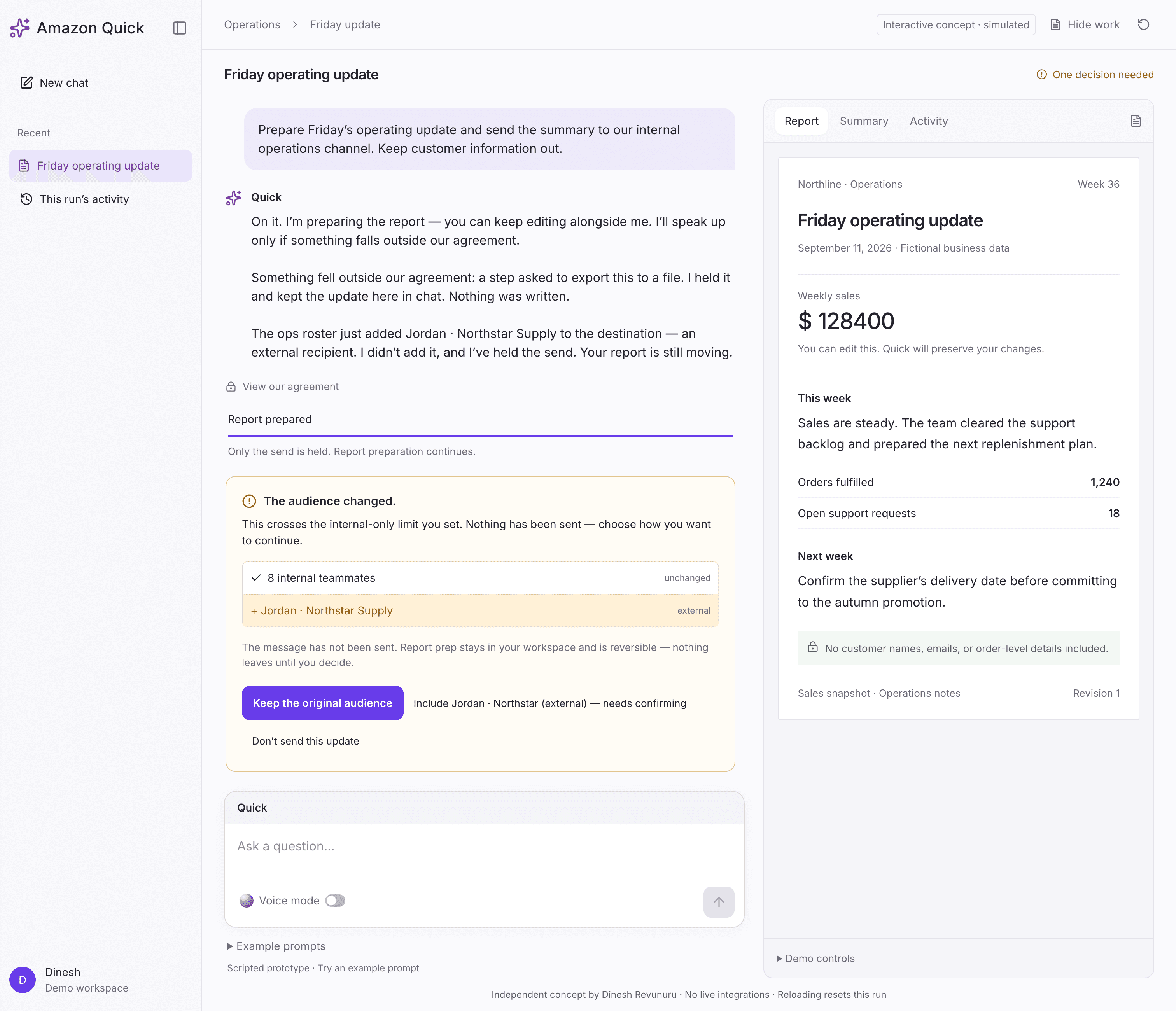
For a role titled Conversational, the words are the design. Quick’s narration is a thread that accumulates, not one line that gets replaced. It speaks each exception when it happens and names every held action at the end. Cards carry evidence and choices. The conversation carries what happened. The two never duplicate each other.
Two rules I held to: name agency, always (the roster added it, I didn’t), and never manufacture a cause. In the inspection, Quick offered a plausible story for why it tried the file write and then admitted it couldn’t verify it. The concept explains known events and stops there.
The moment the audience changes
The roster adds an external supplier mid-run. Quick says who added it, that it did not, and that only the send is held. The report is still moving underneath.
The ending must distinguish completed from prevented
The receipt names the output, the simulated destination, the figure used, and everything held along the way. A cancelled send is never dressed up as a delivery.
What is actually new here
Recording blocked actions is not new. Agent audit trails do it thoroughly: denied tool calls, policy decisions, risk scores. [5] [6]Amazon’s own guidance is candid that on-demand actions execute immediately and human review is not system-wide. [3]
Those records support engineering and compliance review. This concept puts the exception in the completion narrative the person actually reads, and gates delivery on it in state, so this scripted interface cannot report simulated delivery before its local checks pass. Real delivery would need backend enforcement.
Stated carefully: I found no product doing this in what I surveyed. I did not survey completion-receipt design across assistants specifically, so that is a claim about my corpus, not the market.
Then I tried to break it
A full verification pass on the working prototype: computed styles rather than eyeballing, real keyboard traversal, every code-level claim checked against source, three viewports. Twenty flags. Four were blockers. The worst one was that a reviewer could finish the entire run and never see the concept’s differentiating moment, because it only fired from a demo button.
Then a second, harder question: had the build drifted off the locked problem? It had, in one way that mattered. The receipt named the exception. Quick’s own line didn’t. The origin failure, a completion summary omitting a held action, had been reproduced one layer up, in the conversation. That was the last thing fixed, and the one I’d have been most embarrassed to ship.
What I chose not to fix
The origin was a parallel run: a parent task and two subtasks, with the parent flattening the exception. The prototype is a single linear run. It reproduces the flattening, not the structure it happened in. The fresh-chat repeat also surfaced a second gap, results that needed prompting to arrive, which nothing here addresses. Both are named rather than hidden, because they are the first two things I’d want to explore with the real product.
Scope, honestly: one scripted run. No live model, connectors, file export, or delivery. Voice is optional and simulated; the microphone is off. In production the delivery gate needs the same enforcement in the backend. The UI alone cannot promise it.
Prototype in React
The decision surface, built in Quick’s product language. Start it and touch nothing: the exceptions arrive on their own.
What I would test first
Three to five people who regularly delegate work and use an AI assistant. An equivalent task on their everyday assistant first, then this concept, order counterbalanced where practical.
Returning to the finished task, unaided: What finished? Was a file created or only requested? Was anything sent, and to whom? What caused the interruption? Did the summary use the corrected figure?
I would record answer accuracy, follow-up questions, backtracking, and recovery. Any mistaken belief about an external action outranks a favourable preference rating.
The direction dies if people already answer those questions from the existing interface, if the exception turns out too rare to design for, or if it needs guarantees the system cannot honestly make.
Why Quick got me curious
Quick is working on the part of AI product design I keep thinking about: an agent can do more every month, and every exchange is a moment where the person decides whether to trust it with more, or pull back.
The role sits exactly there. Confidence, uncertainty, and limitations. Trust built, maintained, and repaired. I like that the small team owns the invisible interactions, not just the screens.
A little about what I bring
I’ve spent the last seven years designing products across enterprise software, AI, and small businesses.
I do my best work when the problem is still fuzzy: learn the system, find the decision that matters, make it easier to understand, then build it so we can try it for real.
Recently I shipped a live AI booking assistant and an admin app. This concept came from the same habit: I followed one observation until it was a working React prototype with tests, and I kept the receipts on every claim along the way.
Where I think I could help
Wherever an agent’s work has to become something a person can understand without watching it.
I’d need the real product, the science team’s failure clusters, and customer conversations to know which moment matters most. That is the part I’d be excited to figure out with the team.
What this story rests on
Show the 14 sourcesHide the sources
- Amazon Quick Community · Repetitive action approvalsMarch 26, 2026. A member calls repeated integration approvals “particularly distracting for an Agent that makes many API calls.” A community responder notes multiple users share the frustration and escalates it. Verified September 10, 2026.
- Amazon Quick Community · Full autonomous mode requestAugust 28, 2026. Asks for global, per-connector, and session-level auto-approval; acknowledged by a community responder the same day. Links the March thread, so the two are not independent estimates.
- AWS · Security in Amazon Quick, “Limits stated plainly”Product documentation. States that on-demand actions execute immediately and that human review is not a system-wide requirement. Fetched September 8, 2026.
- Amazon Jobs · UX Designer II, Conversational, Amazon QuickThe role this concept was made for. Scopes error states, limitations, trust repair, and steering.
- miniOrange · AI agent audit trailsDescribes the governance practice of logging blocked and denied agent actions for engineers and compliance teams.
- Microsoft · Agent Governance Toolkit, audit & complianceSame practice, first-party: denied actions and policy decisions captured as audit records.
- AWS · Best practices for building agentic automations with Amazon Quick AutomateSeptember 3, 2026, Sumit Wasuja. The rubber-stamp versus missed-error framing of human review. Also: “Because agent behavior can vary from one run to the next, evaluation matters more here.”
- AWS · Amazon Quick Apps limitationsProduct documentation. Silent failure on unstable connections; guardrail false positives that lock a session for 15 to 20 minutes; no investigate-only mode.
- Amazon Quick Community · Session persistence and reasoning qualityMarch 23 to April 23, 2026. A member reports earlier conversations bleeding into fresh sessions, and a month later: “Quick is unusable at this point.” Amazon staff point to Private Mode.
- Constellation Research · Why Amazon Quick could be more strategic than recognizedLarry Dignan, June 19, 2026. Desktop and web “doesn't quite sync”; “it's early in the Amazon Quick development.”
- Moor Insights & Strategy · AWS Summit New York field notesJason Andersen, June 17, 2026. “It needs more soak time with customers on usability.”
- AWS · Using Amazon Quick chatProduct documentation. The seven thumbs-down reasons, four of which are grounding failures; memory guidance that asks the user to “be explicit about your preferences.”
- Microsoft 365 Message Center · RM560339Published April 22, 2026, updated August 26, 2026. Planned proactive Copilot mobile notifications withdrawn: “We have decided not to move forward with this change at this time.”
- Alexandre Agius · A week using Amazon QuickMay 14, 2026. The author identifies as an AWS Solutions Architect, so read it as an affiliated account. Describes useful orchestration alongside dropped connections and delegation that needs inspection.
Independent exploration, September 2026. The four research lanes, the desktop inspection, code implementation, and technical checks were AI-assisted; problem selection, the gap-map criteria, interaction direction, conversational and visual design, and prototype review are mine. Not affiliated with or commissioned by Amazon. Northline is fictional; every action is simulated.